
 Legacy guideTEPS X Share (legacy)
Stop Photos from opening during capture
Use this legacy macOS procedure when Photos opens automatically and interrupts the TEPS capture workflow.
In this article
Image Capture instructions
Legacy documentationThis procedure is preserved for systems that still run this software or hardware generation. Confirm the application and macOS version before making changes.
Mac OS X 10.11.X Yosemite (and newer):
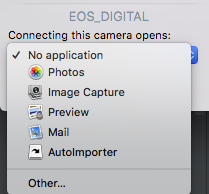 Apple's 'Image Capture'
It is default for Image Capture to try to launch 'Photos' when a new card is inserted. You can turn this off by inserting a card, opening the Image Capture Application, click on the card, an arrow in a box will appear (towards the bottom). Click on that and click 'No Application'
If you'd rather use the Terminal Appliction, copy and paste the code below:
Did this article solve the issue?I still need help →