
 Legacy guideTEPS X Share (legacy)
Disable App Nap for TEPS X Share
App Nap can suspend legacy TEPS applications when they are behind another window. Apply this setting to each listed TEPS X Share application.
In this article
App Nap instructions
Legacy documentationThis procedure is preserved for systems that still run this software or hardware generation. Confirm the application and macOS version before making changes.
Mac OS X 10.9.X Mavericks (and newer):
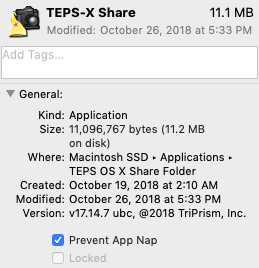 Apple's 'App Nap'
App Nap needs to be shut off for all three apps.
- TEPS-X Share
- TEPS-X Processor
- TEPS-Print Center
To shut off, highlight each app:
Go to Finder>Applications>TEPS-X Share Folder
File>Get Info
Check the "Prevent App Nap" box.
You may also turn it off for the entier computer by inserting the following line of code into Apple's 'Terminal' App
Restart your computer.Then, you can use Activity Monitor to check to see if any of your apps hidden from view are using App Nap
Did this article solve the issue?I still need help →